

Yoast Notifications
Getting the Green, Amber, and Red dot.
Yoast will let you know if we are compliant by using a Green, Amber, and Red dot. Just like a traffic light to let us know if we are complying with its requests. Green is we are OK, Amber means we need to do some work, and Red means we need to fix something. To get a green dot, we need to fix enough of its Amber and Red request, then it will give us a green light.
An Amber color dot overall means that things are OK but we need to fix the problem, in certain situations. There are some things that we can’t fix, or a certain part of the content is fine but needs improvement. Then, there is the Red Dot which means this is something that we need to fix. Some of the dots are easy to fix, some are harder to fix. We can still get a green dot for SEO and Readability with one Red Dot.
- Green Dot: everything is OK
- Amber Dot: things are fine but can be improved.
- Red Dot: the item needs to be improved.
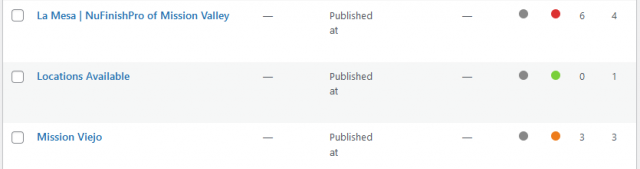
Yoast Important Items to satisfy.
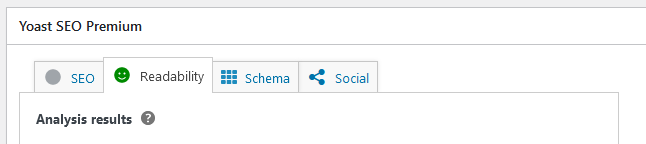
There are a lot of things that Yoast SEO tracks, the two most important overall categories are SEO and Readability. These two items are the first two tabs in the Yoast Widget on each page. These two tabs are the only two that have a Color dot that we have to get a Green Light for.
First Tab in Yoast, SEO
The SEO tab controls the MetaTags for the page, Meta Title, Meta URL, Meta Description, and Keywords are controlled on this page. Yoast SEO uses something called KeyPhrases to organize the Meta Keywords. Besides MetaTags, Yoast SEO will analyze the content and make Keyword Suggestions here. Each Type of Meta Tag will have a number of bullet points that have a color dot next to it. When we have added all of the content for the page, Yoast will make recommendations on what we need to do for each Tag. We need to get as many Green dots as we can when we create the site content.

Second Tab in Yoast, Readability
The Second important tab is the Readability tab, this tab also has Three-color dots and makes recommendations based on readability. There are a lot of recommendations that Yoast will make here. When we write content we will be given a Green dot for all of the conditions we meet. The whole point of having a readability tab is to make sure that the website content is easy for a person who has no knowledge of the product or content to understand it.
The biggest metric that Yoast will flag us on is Fleisch Readability, we are assigned a score based on how easy the content is to read and understand, to get a green dot for the page we need to get a minimum of 60 to be considered easy to read. If we get green dots for all of the other readability metrics but don’t pass the Fleish Readability Score, we will not get a green dot, so readability is one of the big metrics that Yoast measures besides proper meta tags and keywords.
Helpful Articles:
Keyword Stuffing
The other issue that affected the site is Keyword Stuffing, I found that the images that are not related to the content like Logos, location images, and the background images were full of SEO Keywords, mainly “Bathtub Refinishing”. Yoast does not like this, because it is considered Keyword Stuffing, and this is a big no-no. I went ahead and removed the extra keywords from the images in the Media Library.
Helpful Article: