

Nextdoor Admin Dashboard
Nextdoor is a local neighborhood social networking service. People who live in a neighborhood can network with one another to share information. Sell things to one another and keep in touch with one another. As a business owner in next door, you can advertise your services, and provide local services to your neighbors in a local area. In order to do anything, you have to set up a profile on Nextdoor, then claim a business and verify the location.
Accessing Nextdoor.com
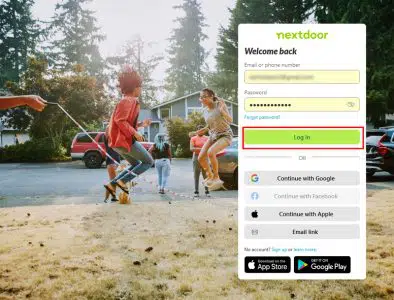
To access next door. First, log in to Nextdoor by using your login and password for the portal. If you want, you can set up your own profile before you log in. If you want, you can claim a local business, you will have to follow a number of steps. Add a phone number to complete the verification process, so you can unlock other services in your business profile.
Verify your profile to use certain services on Nextdoor.
Click on the login button at the top right-hand corner of the screen, then enter your login and password to enter the profile.
Claim Business location
To claim a location, go to “Sign up for free” or Claim your free business page”. Enter your email address so that Nextdoor can send you a link to claim the business. Verify the account so that the website’s services can be used after your account is created.
You will need to enter the physical location of the business to claim the location. A mobile phone number, email address, and a website are required before you can claim a location. Once you have entered a category that bests fit your business, you can claim the business.
Useful Link
https://help.nextdoor.com/s/article/How-to-claim-your-business-page?language=en_US#claim
Verify Business Location
To begin, you will be sent an email to verify the location before you can post deals, sponsor a neighborhood, or view and respond to recommendations. Secondly, you will need to verify your account by using a mobile number, then a code will be sent to your phone number. Finally, enter the code you receive into the text field provided, then complete the steps requested. After that, edit your profile once the account is verified.
If you can’t verify by phone, then you can verify the business by providing documentation.
Acceptable Documentation:
- Government-Issued business licenses and permits from local, state, or federal government
- Business Tax or VAT registration certificate
- EIN confirmation letter from the IRS (the U.S. only)
- Official tax notices from the IRS (the U.S. only)
- Business bank account statements, with account number redacted
- Business credit report from one of the reporting agencies
- Fictitious Business Name Statement (the U.S. only). Please provide this in addition
- to one of the above documents, if you do business under a different name.
Please refer to the link below for more information.
https://help.nextdoor.com/s/article/How-to-claim-your-business-page
Useful Links
Local Deals Guide for Small Businesses
https://business.nextdoor.com/local/resources/your-local-deals-strategy-when-to-run-another-local-deal
Getting started FAQ
https://help.nextdoor.com/s/topic-page
Verify your business
https://help.nextdoor.com/s/article/Verify-your-business-to-access-gift-card-delivery-features
Business Page Policy
https://help.nextdoor.com/s/article/Business-Page-Policy