
YouTube Copyright
At times there is a need to make a copy write a claim, this part of the Studio will help you.
When you have videos on YouTube, copyright will become an issue. The Copyright page will keep track of any claims that you file against someone else or if you receive a copyright strike/claim that is filed against you. Regardless of whether you own your content or have licensed the right to use videos, other YouTubers may file a claim against you. Please be aware that this can happen to any content creator.
If, someone is using any content on your channel that you own without permission. A removal request can be filed with YouTube to take down the video. This page will show any claims that have been filed and the status.
Filing a copyright claim.
The channel copyright page will list any removal requests that have been filed against other YouTubers. When you send a notice to have a video taken down on copyright grounds, this is called a removal request. You will be able to track the progress of copyright take-down claims on this page.
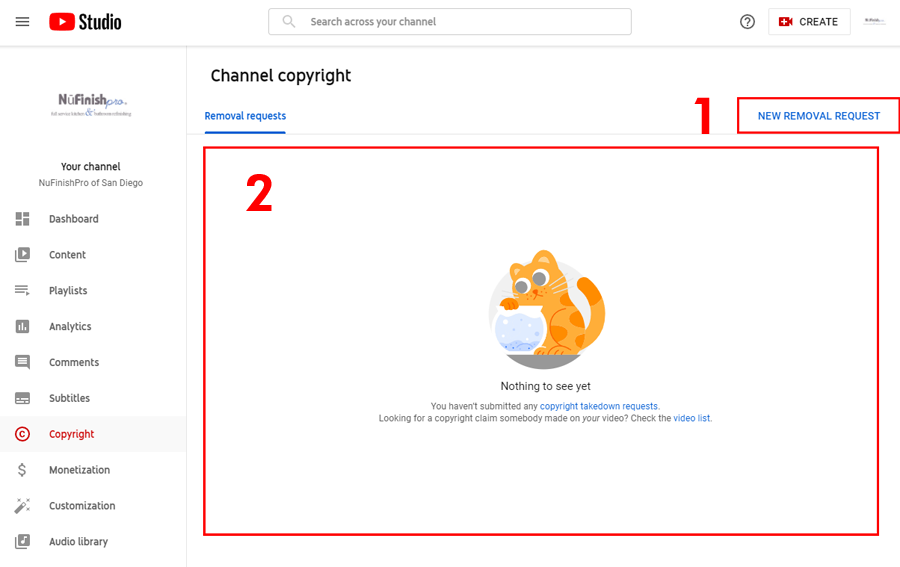
- When you are ready, click on the “New Removal Request” to begin filling out the removal form.
- All removal requests that have been filed will be shown here.
Removal request form
You will be required to submit the YouTube link containing your copyright-protected work. The type of work that is violating your copyright i.e. song, video, logo, or etc needs to be chosen from the drop-down menu. You can add multiple items to the removal request. Then, fill out the form completely and agree to the legal agreement before you submit your request.
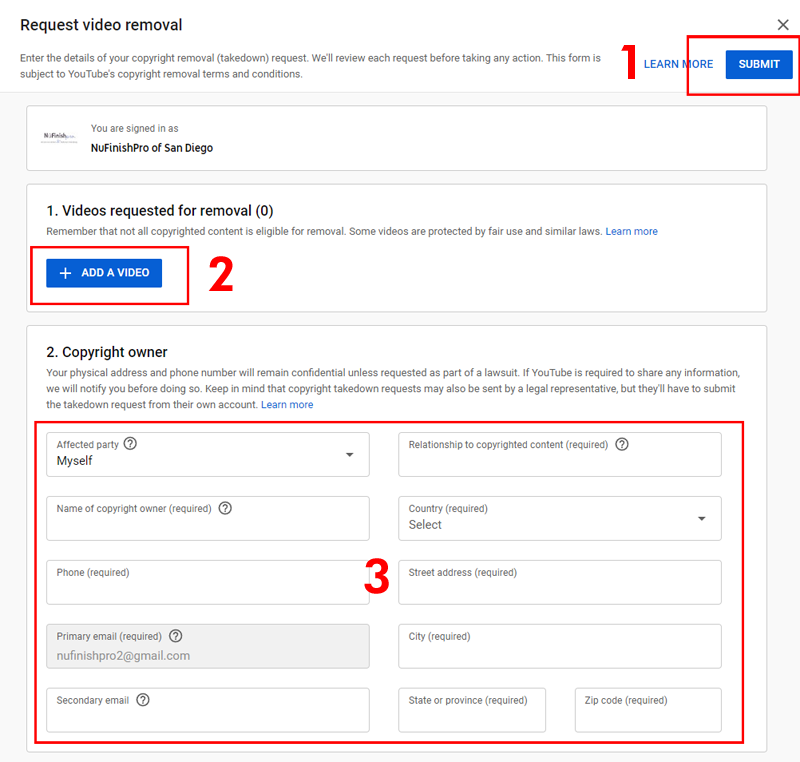
- When you are ready, click on this link to submit the removal request.
- Add the video with the copyright violating material. The proper form will appear once the type of work is chosen. Fill out the form as completely as possible. In some cases provide a description of your copy-written work. After that, provide a link to the YouTube video that contains your copy-written material. You can add multiple video links.
- Fill out the form as completely as possible.
Submitting a removal request.
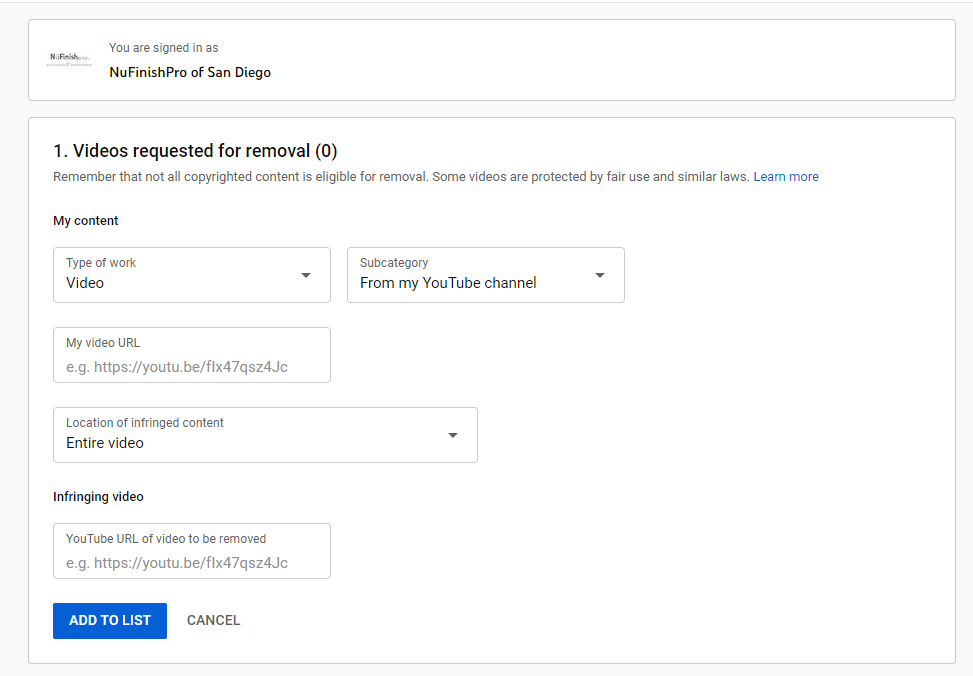
When you choose the type of work and subcategory, a specific form will appear for that type of content. There will be a different form for each type of content. In this form, a video take-down is being requested. Provide them with your video URL that contains your video content that is being used without your consent or permission. Then, provide YouTube with either the entire video or the specific time period where the copyrighted content is being used.
Be aware that in some cases the other person’s video is covered under fair use.
Other types of work
In this case, the type of content does not fit the predefined set of items. You will need to provide the specific type of copyrighted work that is being used. Provide YouTube with the title of your copyrighted work, provide a description of the video. Then explain why and how the infringing video is violating your copyright.
When you are ready to add the item to the list, click on “ADD TO LIST”. You can add multiple links to the list but are required to provide a proper title and description of the violation. Other types of work like songs, logos, artwork, live performance, or software will require different information to be submitted.

Copyright owner
As the owner of the video, you are required to submit your name phone number, and physical address along with your email address. This information will be kept private. Unless YouTube is required to share it because it has been requested via a court order or lawsuit. If YouTube is required to share it, you will be notified.
- When you fill out the removal request, you have the option of choosing a scheduled or standard removal. Plus, the option of blocking any new appearances of your video is an option.
- You will need to check all of the boxes in the legal agreement before the request can be filled. Once you have read all of the legal agreements, and are ready to submit the request. Enter your full legal name by typing it into the signature box.
Useful information
Submit a copyright take down request
https://support.google.com/youtube/answer/2807622?hl=en&ref_topic=9282363
Requirements for copyright infringement notifications: Videos
https://support.google.com/youtube/answer/6005900?hl=en
Requirements for copyright infringement notifications: Non-video content
https://support.google.com/youtube/answer/9516993?hl=en&ref_topic=9282363
Remove claimed content from videos
https://support.google.com/youtube/answer/2902117